Skip to content

Announcing token brokering for cost control in Tetrate Agent Router Enterprise

Learn more

Give Agents
Access to the Only
Tools They Need

Create a synthetic MCP server to give your agents a curated subset of tools drawn across your real MCP servers. Reduce risk of agents taking unwanted actions, reduce context windows, avoid tool confusion.

MCP Gateway Controls Access to Tools, but Also Reduces Costs, Improves Agent Accuracy, and Reduces Risk

Reduce Risk

Stop agents from touching tools they shouldn't

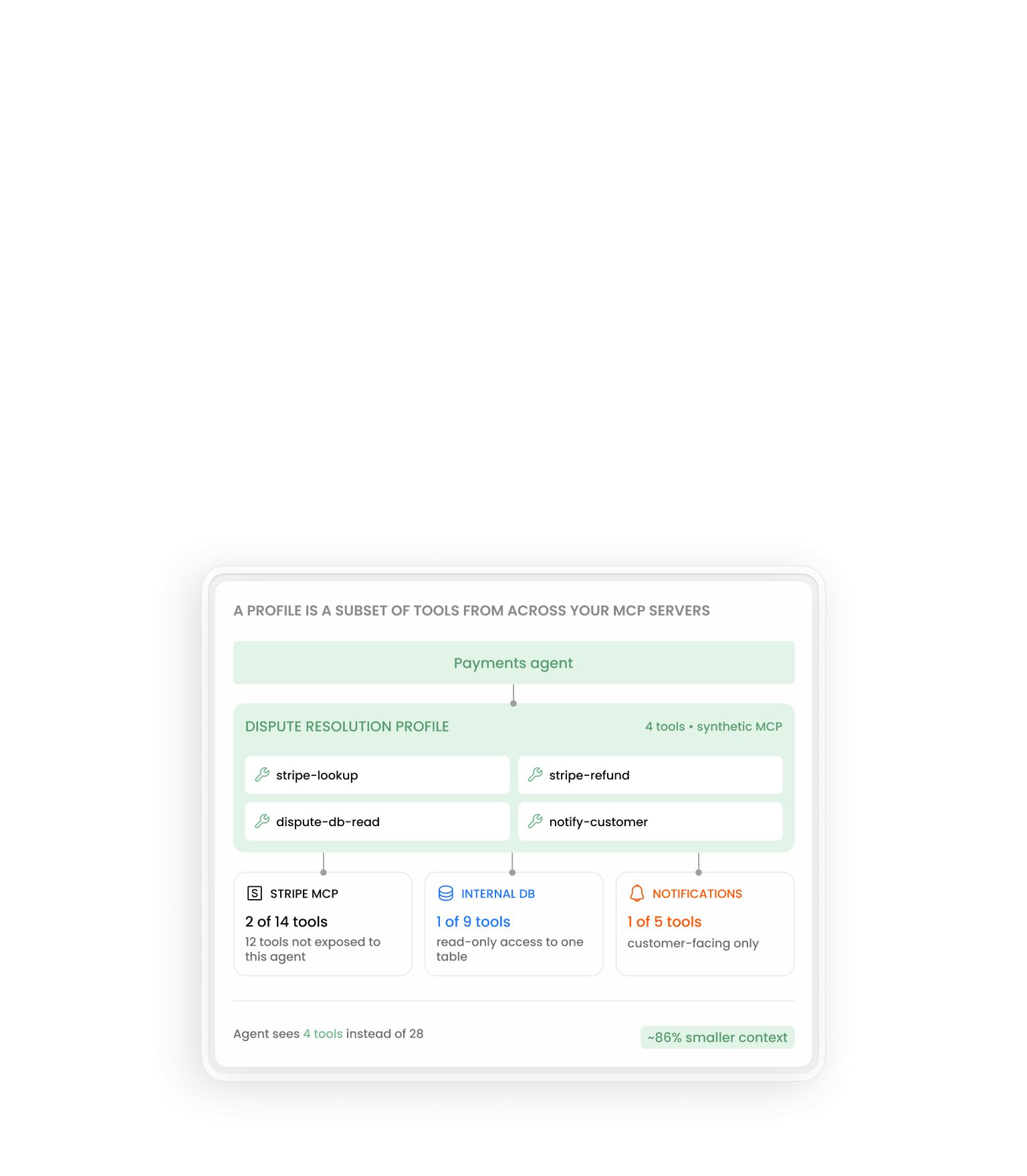
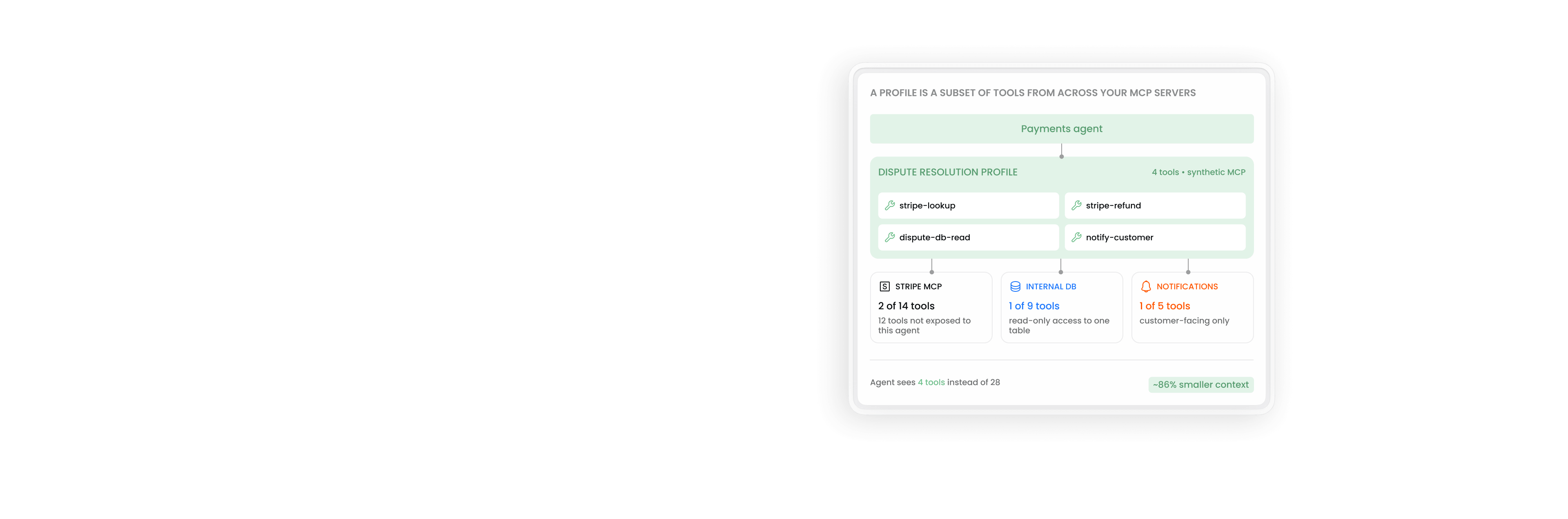
A payments agent doesn't need access to hr-directory, salesforce-update, or every other tool on every MCP server. Profiles enforce least-privilege at the tool layer: the agent can't call what isn't in its profile, accidentally or otherwise.

Improve Accuracy

Make agents more accurate by reducing tool confusion

When an agent sees 30 tools but only 3 are relevant, it has to reason over all 30 — and may pick a semantically similar but wrong tool. With 4 tools in scope, the right call is obvious. Tool selection becomes deterministic instead of probabilistic.

Save on Costs

Reduce MCP tool noise and token waste

Tool definitions are injected into the context window before the first message. 30 tools at 80–200 tokens each can burn 2,400–6,000 tokens before the agent does anything. A 4-tool profile keeps the context window lean and the per-call cost predictable.

Our MCP Gateway Lets You Create Synthetic MCP Servers, We Call Profiles

Instead of pointing your agent at full MCP servers, you point it at an MCP Gateway profile. The profile presents itself to the agent as a single MCP server — but it's actually a curated subset of tools drawn from across whichever real servers you want to expose.

Pick tools, not servers

Choose individual tools from across any MCP servers in your catalog. Stripe has 14 tools; you take 2. Internal DB has 9; you take 1. The profile is the union of exactly those tools — no more.

Agent connects to one endpoint

From the agent's perspective, the profile looks and behaves like a single MCP server. No special configuration in the agent. No code changes if you adjust the profile.

Changes propagate at next request

Add a tool to the profile — every agent using it gets the tool on next call. Remove one — access stops everywhere simultaneously. No key rotation, no agent redeployment.

Revoke instantly without taking down the server

If an agent starts misbehaving or you need to cut off access for any reason, revoke the profile from the admin console. The agent loses access immediately — but the underlying MCP servers stay up for everyone else.

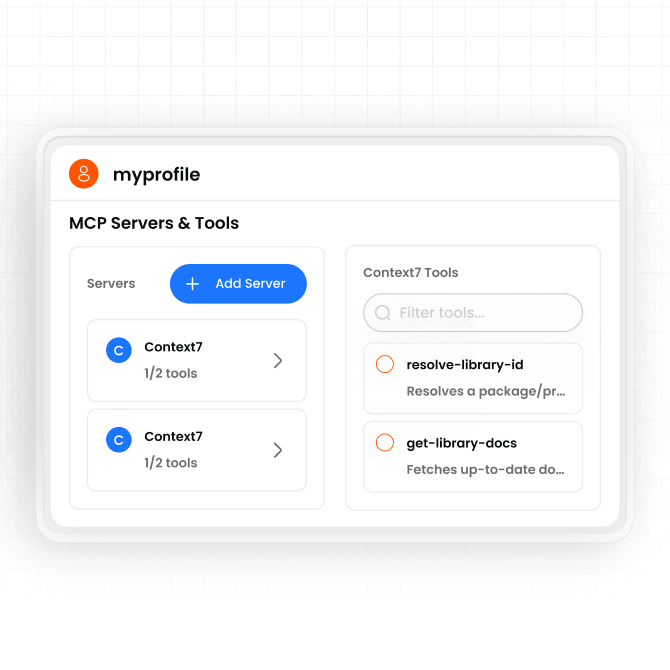
An MCP Gateway profile named myprofile exposing a curated set of Context7 tools to an agent as a single MCP server

A Managed Catalog of Public, Internal, and Synthetic MCPs

MCP Gateway gives platform leads a single place to manage three categories of tool exposure across the org — without spinning up servers manually or hand-coding access logic.

Public MCPs

Third-party servers you proxy

Stripe, GitHub, Slack, Jira — connect once to MCP Gateway, expose specific tools to specific agents. The gateway holds the credentials, not your agents.

Internal MCPs

Your own MCP servers, shared safely

Internal databases, business logic, custom APIs — wrap them as MCP servers once, then expose specific tools to other teams through the catalog without sharing credentials directly.

Synthetic MCPs (Profiles)

Curated subsets for specific agents

The fine-grained layer. Take a few tools from a public MCP, a few from an internal one, combine into one profile, point an agent at it. The same primitive that delivers security delivers token optimization.

Revoke a profile, keep the servers running

If an agent starts behaving badly — or its access scope changes — revoke the profile from the admin console. The agent's access stops immediately, but the underlying MCP servers stay up for everyone else. No service interruption, no key rotation, no redeployment.

Works with Any MCP-Compatible Framework and Server

Agent frameworks

  • Claude Code Native MCP support, configure server URL
  • LangChain / LangGraph MCP tool integration via adapter
  • Any MCP-compatible client MCP SDK for Python, TypeScript, Rust

MCP server types

  • Internal MCP servers Self-hosted, behind your firewall
  • External SaaS MCP servers Stripe, Salesforce, Slack, GitHub, and others with MCP support
  • Custom MCP servers Any MCP-spec compliant server your team builds

Observability

  • OpenTelemetry collector Traces and logs via OTLP, correlates with AI Gateway spans
  • Datadog APM spans and log management
  • Splunk / Grafana / S3 Same export options as AI Gateway

Questions about MCP
and MCP Gateway

A profile is a synthetic MCP server — a curated subset of tools assembled from across your real MCP servers. From an agent's perspective, the profile looks and behaves like a single MCP server, but you control exactly which tools are inside it. The same mechanism delivers two outcomes: agents can only call tools they're authorized to use (security), and they only see the tool definitions relevant to their job (token optimization and reduced tool confusion). Add a tool to a profile and every agent using it gets access at next request. Remove one and access stops immediately. Revoke the whole profile and the agent is cut off without taking down any underlying MCP server.

MCP (Model Context Protocol) is an open standard developed by Anthropic for how AI agents connect to external tools, services, and data sources. An MCP server exposes a set of tools — functions an agent can call — along with their names, descriptions, and parameter schemas. An MCP client (your agent) connects to the server and can invoke those tools. MCP standardizes this interface so any agent framework can work with any MCP server without custom integration code.

When an agent calls an API directly, it needs custom integration code for every API it uses — authentication, request formatting, response parsing, error handling. MCP standardizes all of that. An agent that speaks MCP can connect to any MCP server without writing custom integration code for each one. From the model's perspective, MCP tools are presented as a uniform interface: here are the tools available, here are their parameters, here is the result. The practical difference is that MCP makes tools composable and discoverable at scale in a way that bespoke API integrations are not.

MCP is a protocol for how an agent connects to tools and external services — databases, APIs, file systems, SaaS platforms. A2A (Agent-to-Agent, currently a Google-led proposal) is a protocol for how agents communicate with other agents — delegating tasks, passing context, coordinating multi-agent workflows. The two are complementary rather than competing. An agent might use MCP to call a Stripe tool and A2A to hand off a subtask to a specialized sub-agent. MCP Gateway governs the tool access layer. A2A governance is a separate, emerging concern.

When an agent connects to an MCP server, every available tool is injected into the model's context window as part of the system prompt — its name, description, and full parameter schema. The model needs to see all available tools to decide which one to call. Each tool definition typically consumes 80–200 tokens. An agent with access to 30 tools burns 2,400–6,000 tokens on tool definitions before processing a single message. Those tokens are billed at the same rate as any other input tokens, and they reduce the effective context window available for the actual task. This is why curated tool profiles — which restrict each agent to only the tools its job requires — directly reduce per-call cost and improve model reasoning quality.

An MCP server exposes tools — it runs alongside or on top of a real system (a database, a SaaS API, a file system) and advertises what operations are available. An MCP client is the agent or agent framework that connects to the server and calls those tools. In Agent Router, MCP Gateway sits between the client (your agent) and the server (Stripe, your internal database, Slack, etc.) — enforcing access controls and logging every call before it reaches the server.

They can, and many do. The problem that emerges at scale is the same one that appeared with direct LLM provider connections: no visibility, no access controls, and no shared place to attribute usage or enforce policy. An agent calling an MCP server directly handles its own credentials, defines its own tool scope, and produces no shared log. When you have dozens of agents across multiple teams all calling tools directly, you have no way to see what's being called, by whom, or at what cost — and no mechanism to prevent an agent from calling a tool it shouldn't. MCP Gateway is the control point that makes tool access observable and governable without changing how agents are built.
Yes. MCP Gateway works with any MCP-spec compliant server — internal servers your team builds, external SaaS servers from vendors (Stripe, Salesforce, Slack, GitHub), or self-hosted open source servers. The gateway is protocol-native. As long as the server speaks MCP, it can be added to your catalog and governed through profiles.

Have Questions?
Or Want To Start Now?