Half your people don't know what an API key is
Engineers edit a settings file in a minute. The person in marketing who installed Claude Desktop can't, and shouldn't have to.

AI tool onboarding for every laptop
Tetrate Desktop connects Claude Code, Claude Desktop, and Codex to Tetrate Agent Router Enterprise. People sign in once. Your policy covers every request.
Why onboarding stalls
You set up the gateway, the policy, and the guardrails. None of them help until the traffic from each laptop reaches the gateway.
Engineers edit a settings file in a minute. The person in marketing who installed Claude Desktop can't, and shouldn't have to.
New tools ship every month, and a tool's config format can change between versions. A guide written in June is wrong by September.
Manual setup copies base URLs and provider keys into settings files on every laptop. Every copy can drift, and every copy can leak. Read about API key sprawl.
If the approved setup takes an afternoon, people find another way to use the tool. Nobody files a ticket, and nothing warns you.
How it works
Sign in once, and Desktop connects the rest. Four steps on a fresh laptop, and nobody opens a settings file.
Desktop opens your organization's sign-in page in the browser. If IT pre-set the connection, Desktop goes straight there.
Agent Router Enterprise issues this install a key. Desktop keeps the key in the macOS Keychain and starts the local gateway on 127.0.0.1:1975.
Desktop lists the AI tools it found on the machine. You see every file it will change before it writes, and it backs up each one first.
Reopen the tool and send a prompt. The request shows up in Desktop's log and in the Agent Router Enterprise admin console, with your policy and guardrails applied.

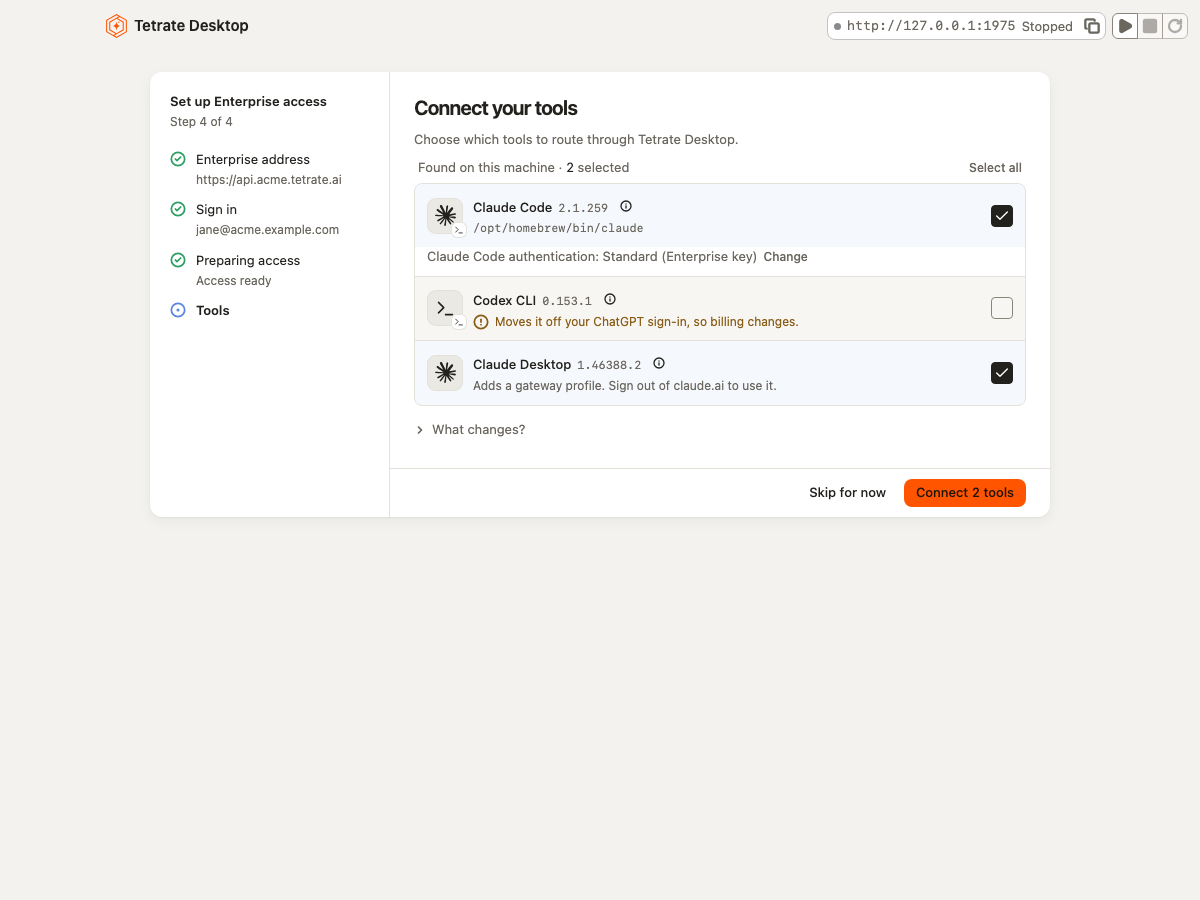

The install's key stays in the Keychain. Each tool gets its own tool key, which works only against the local gateway.

Desktop stages each change with a diff and keeps a record, so any earlier configuration rolls back.

Captured request and response bodies stay local. Only the model requests leave, and they go to your Agent Router Enterprise.

Disconnecting stops the gateway, removes the key from the machine, and asks Agent Router Enterprise to revoke the key.
Supported tools
Desktop writes each tool's settings for you. Anything else that speaks Anthropic Messages or the OpenAI API gets a key and a paste-in.
| Tool | Setup | What Desktop changes | Know before you connect |
|---|---|---|---|
| Claude Code | Automatic | Writes the gateway URL and the new key into ~/.claude/settings.json. Existing Claude Code is reconfigured and inside Claude Desktop. | Claude Code picks up the change the next time it starts. |
| Claude Desktop | Automatic | Adds a third-party inference configuration that points at the gateway, and copies your local MCP servers into the new profile. No key is written into a file. | Sign out of claude.ai, then quit and reopen. MCPs that point straight to local servers in this release. |
| Codex | Automatic | Adds the gateway as a model provider in ~/.codex/config.toml, and configures the local key. The browser session keeps your real identity there. | Codex must use an API key in place of a ChatGPT sign-in, which changes how its usage is billed. |
| Opencode and others | Guided | Creates a tool key and shows you what to paste into the tool's settings. | Works with any tool that speaks Anthropic Messages or OpenAI-compatible requests. |
Next up: Cursor and Coder.
One install, two kinds of user
Both paths end on Agent Router Enterprise.
For engineers
tetrate serve runs the gateway headless. Every step in the window has a CLI equivalent. ~/Library/Application Support/Tetrate Desktop/ that you can read, diff, and commit. 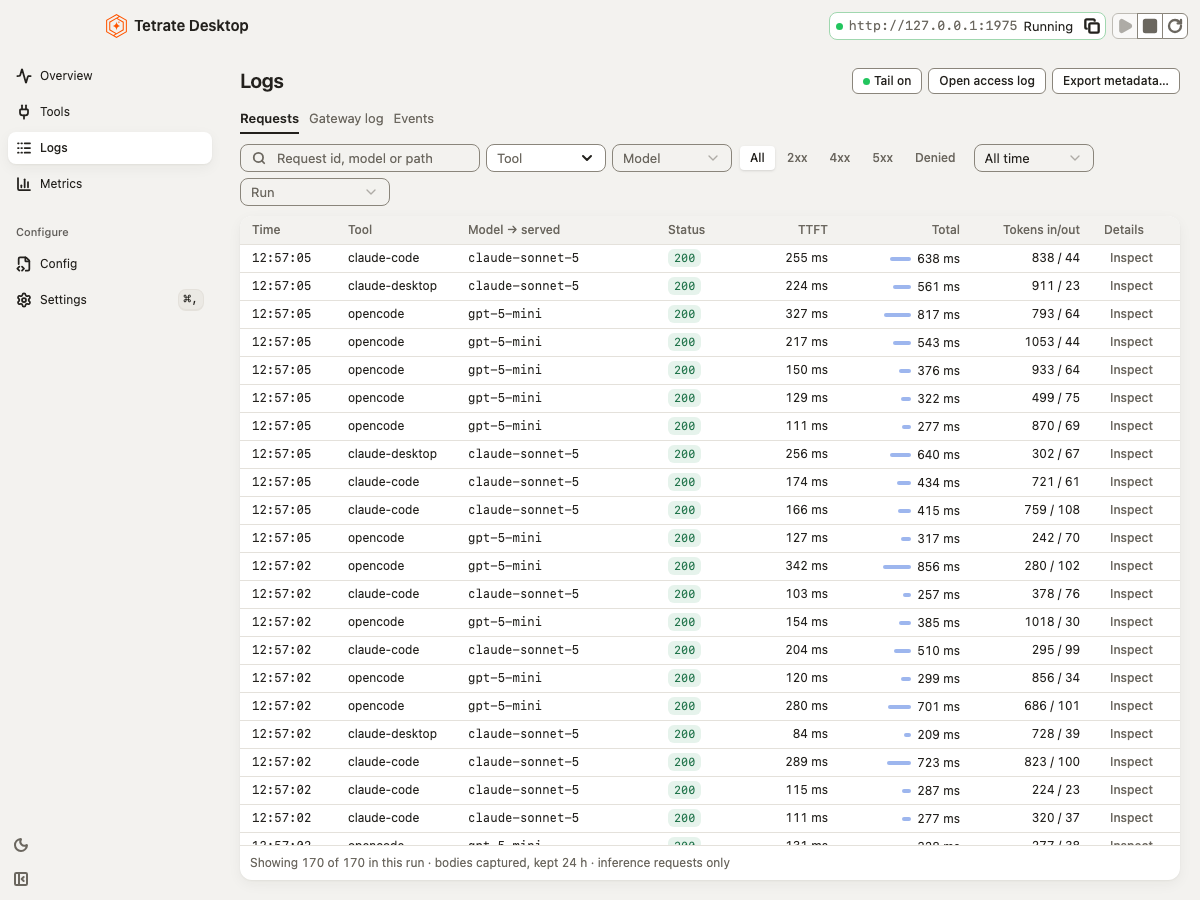
For citizen AI builders
For IT and platform teams
Push the package and a configuration profile before anyone opens the laptop. People see one notification and sign in once.


A configuration profile for io.tetrate.desktop, or a root-owned managed.json, sets the Agent Router Enterprise address. Desktop shows it as "Set by your organization."
Track: minutes from unboxing to first request.


Tell Desktop in advance which tools to connect, and people skip tool selection. IT decides what's on the path.
Track: share of AI requests that reach Agent Router Enterprise.


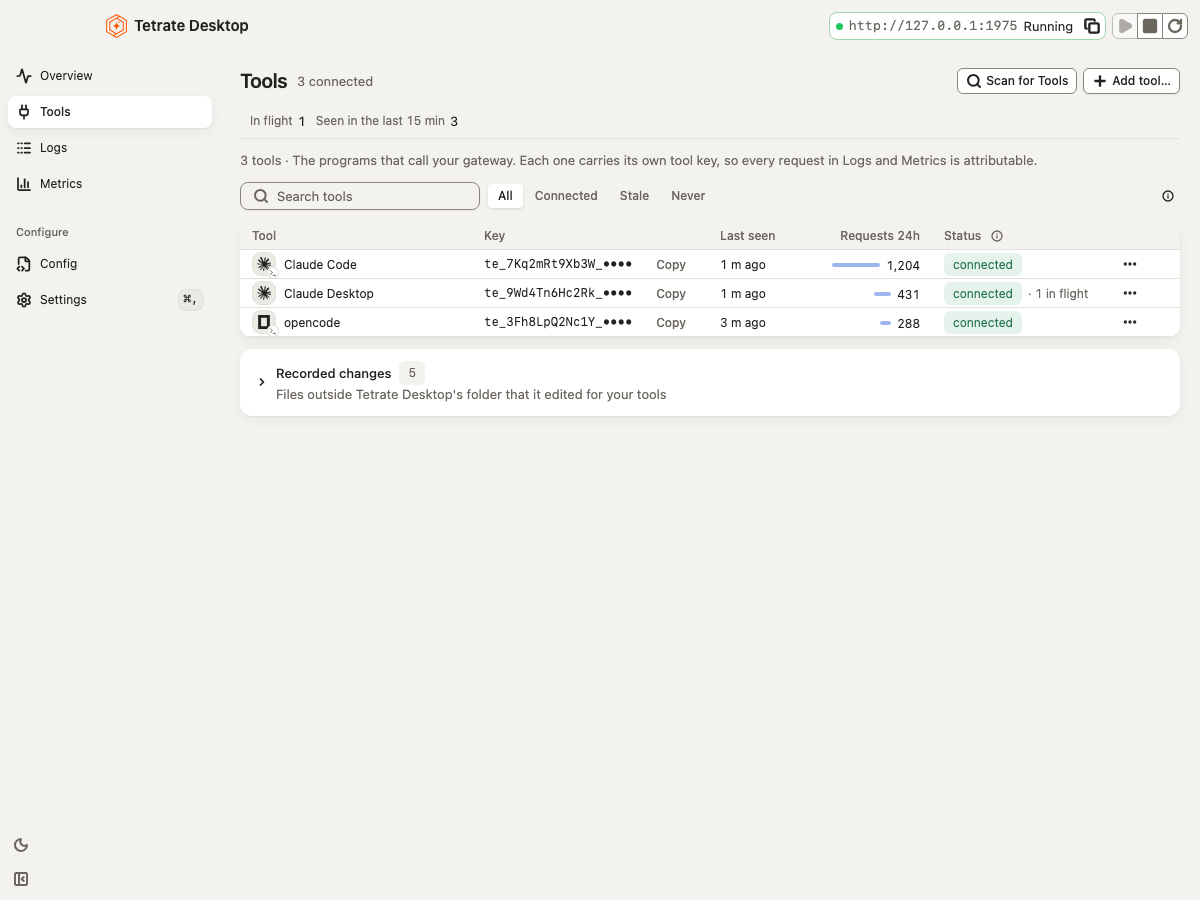
Each tool has its own key, so Agent Router Enterprise can tell Claude Desktop traffic from Claude Code traffic on the same laptop.
Track: requests and tokens by tool.


The same managed settings turn on start at login and leave updates to IT, so the gateway is running before the first prompt.
Track: setup tickets per new AI tool (target: zero).
Architecture
A request takes one path. The local hop runs on localhost, and in our testing adds about a millisecond.
 Tetrate Desktop
127.0.0.1:1975 Tetrate Agent Router Enterprise Model provider 127.0.0.1:1975, built on Envoy AI Gateway Bring every AI tool under your control
See how Tetrate Desktop connects your team's AI tools to Agent Router Enterprise with centralized governance, secure access, and visibility into every request.
FAQ
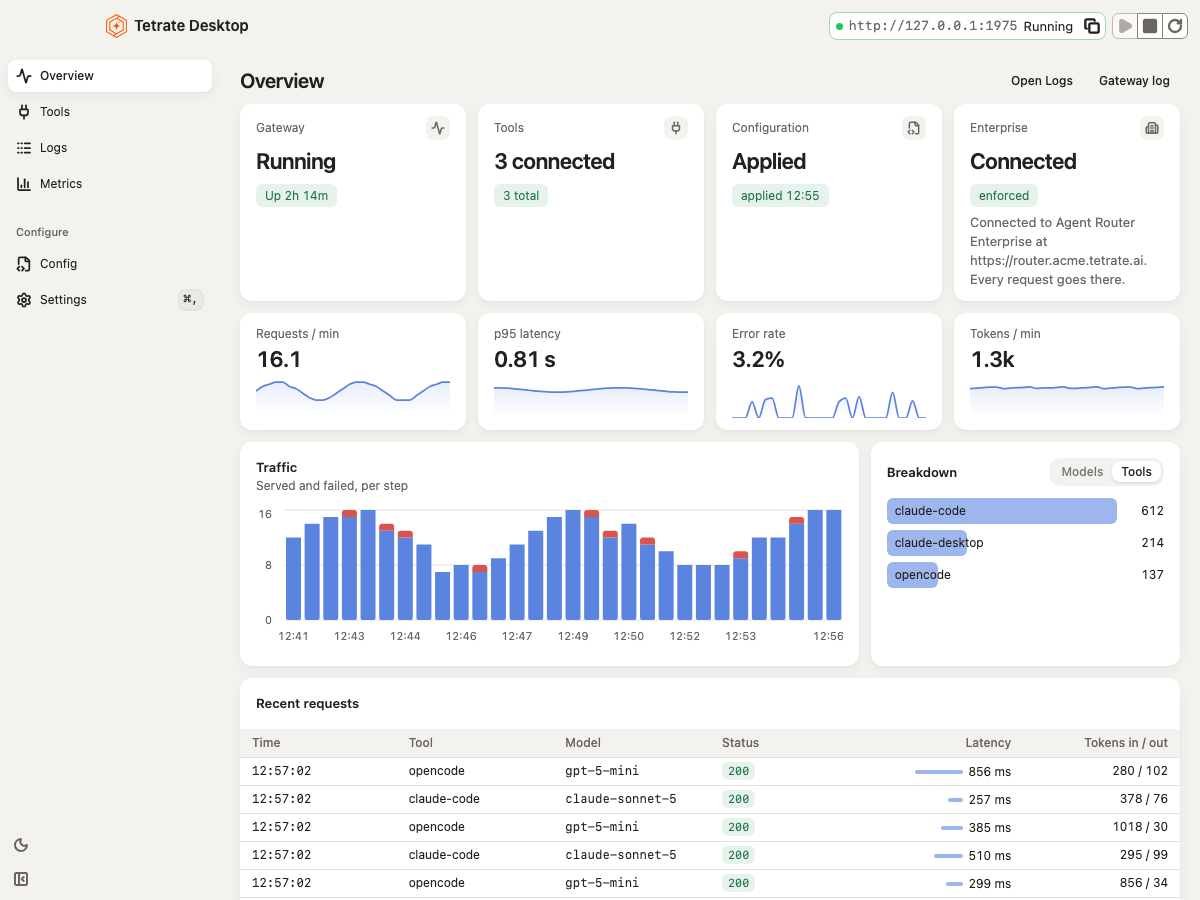
Tetrate Desktop is a macOS app that connects the AI tools on a laptop to Tetrate Agent Router Enterprise. It finds Claude Code, Claude Desktop, and Codex, routes each one through a local Envoy AI Gateway, and logs each request's tool, model, latency, and tokens.
Desktop sets up Claude Code, Claude Desktop, and Codex automatically. For opencode and any other tool that sends Anthropic Messages or OpenAI-compatible requests, Desktop creates a tool key and shows the settings to paste.
Not yet. Cursor and Coder support comes next. Today Desktop sets up Claude Code, Claude Desktop, and Codex automatically, and gives other tools a tool key and settings to paste.
Claude Code reads its gateway address and key from ~/.claude/settings.json. Tetrate Desktop writes both for you: the address of the local gateway and a key for Claude Code alone. From its next start, Claude Code sends every request through Tetrate Agent Router Enterprise.
Make the approved path the easy one. IT pushes Tetrate Desktop and a configuration profile through MDM, people sign in once with SSO, and Desktop connects their AI tools to Tetrate Agent Router Enterprise. Every request then meets your policy and shows up in your logs.
No. Desktop is a companion to Tetrate Agent Router Enterprise. You sign in with your organization's Agent Router Enterprise account before Desktop connects any tool.
Request and response bodies, the request log, and metrics stay on your machine. Only the model requests leave, and they go to your organization's Agent Router Enterprise. You can send local metrics and traces to your own collector over OTLP.
IT pushes the installer and a macOS configuration profile through MDM. The profile sets the Agent Router Enterprise address, so people skip setup and sign in once with SSO. The same settings can turn on start at login and leave updates to IT.
Very little. The gateway runs on the same machine as the tool, so the extra hop stays on localhost. In our testing the local hop adds about a millisecond per request.


For teams rolling out AI tools

Already running Agent Router Enterprise? Connect a test laptop with a Tetrate engineer and see the first requests in your admin console before you roll out to the fleet.